
Back to the Order Build Overview
The expiration and dispensing documentation settings help ensure that prescription records are complete, accurate, and compliant with protocol and site requirements. These Order Build options define how expiration dates are calculated, whether additional verification is required, and what preparation or thawing information must be documented during dispensing. Careful configuration of these settings helps promote consistency across users while supporting accountability, patient safety, and regulatory documentation requirements.
Required permissions
ProtocolSnapshot - Ability to view the Summary page of a Protocol (Protocol Snapshot). Required for all other protocol view permissions.
ProtocolManagement - Protocol Management
EditProtocolDrugsOrders - Drug management for a protocol
Drug Expiration
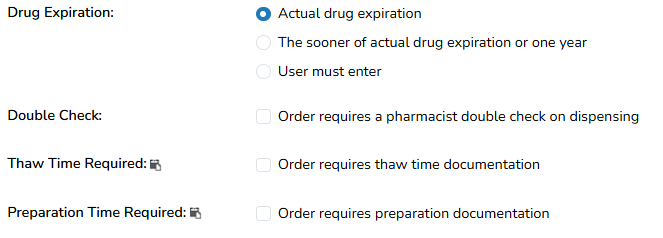
Sets the method for calculating the drug expiration for an order. This field is for dispensing of this order only and this does not change the expiration dates of the items in the inventory.
-
Actual drug expiration: The system will use the actual drug expiration date. If the actual drug expiration date is unknown, it will print “Unknown” on the labels. If the order has multiple expirations, it will default to the shortest expiration.
-
The sooner of actual drug expiration or one year: Calculates the drug expiration to the sooner of the actual expiration date or one year from the prescription date. If the order utilizes inventory that has an unknown expiration, Vestigo will default the drug expiration to one year. If the order utilizes multiple drugs with unknown and known expirations, it will default to the shortest date or one year.
-
User Must Enter: Requires the user to manually enter the expiration date. Typically used for short expirations (e.g. IVs).
Note - Edits to the Drug Expiration setting do not impact historical prescriptions where the order was used.
Unknown Expirations and Facility Recheck Switch
When the facility setting to use the Inventory Recheck Date as the expiration date is enabled, products with an unknown expiration date will automatically default the Drug Expiration Date to the inventory recheck date, provided a recheck date has been entered.
To learn more about this setting, please review the Facility Switch article.
Double Check Verification
If this setting is checked, a second verifying user will need to verify the dispense. Both verifying users will be visible on the DARF. If your site prints technician signatures on the DARF, there can be 3 separate user names for each dispense, depending on sites workflow.

Edits to the Double Check Verification requirement do not impact historical prescriptions where the order was used. If this setting is enabled after a dispense, users will need to void the dispense and reprocess it, if the dispense requires the second check.
Thaw Time Required
If this value is set, users will be required to record a thaw time when entering the dispense. When completed these fields will print as a comment on the DARF.


Consideration Point: Sites will need to establish how to define what Thaw Time means.
Note - Edits to the Thaw Time requirement do not impact historical prescriptions where the order was used.
Preparation Time Required
If this value is set, users will be required to record a preparation time when entering the dispense. When completed these fields will print as a comment on the DARF.

Consideration Point: Sites will need to establish how to define what Preparation Time means.
Note - Edits to the Preparation Time requirement do not impact historical prescriptions where the order was used.