
Completed cycles appear in the Billing Cycle list. Selecting a cycle displays summary information, invoice management, billing extracts, and an audit report.
Once a billing cycle runs, it appears in the dropdown of Billing Cycles on the Billing Main screen.
When you select the cycle, the Billing Cycle Statistics will display with a panel of summary information about that cycle with some reports and the ability to manage the invoices.
Editing a Billing Cycle Name
- Select the billing cycle on the Billing Main page
- Select Edit next to the cycle name
- Update the billing cycle name
- Click Submit
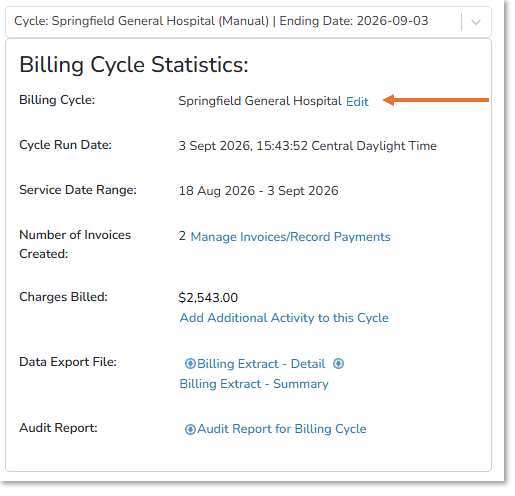
Note - The billing cycle date remains unchanged and cannot be edited.
Adding Additional Activity to a Billing Cycle
Deleting an Invoice
After a billing cycle has run, additional activity can be added to it provided that the account does not have an active invoice. If you need to add additional activity to an invoice, you must first delete that invoice.
- Select the billing cycle on the Billing Main page
- Select Delete Invoice next to the invoice that has charges that need to be edited.
- Add Reason for deletion and Delete
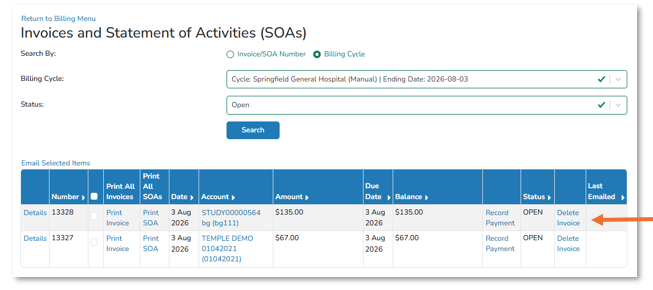
You can then edit and charges as needed and then add the updated charges back into the billing cycle.
Adding additional activity to invoice or regenerating the invoice after edits to the charges have been made.
- Confirm that the account does not have an active invoice
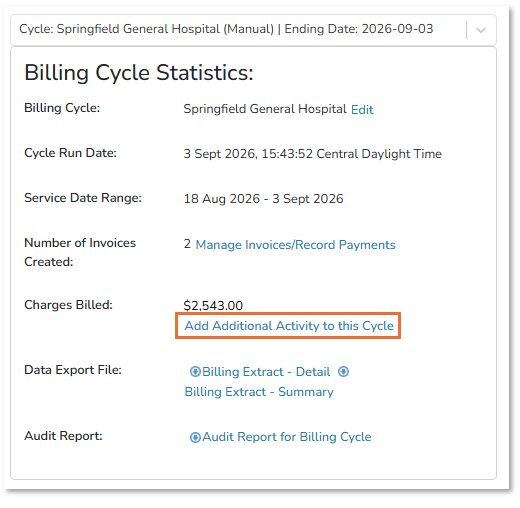
- Select Add Additional Activity to this Cycle in Billing Cycle once selected
- Select eligible accounts and activity to process
- Select Process
Billing Cycle Reports
- Date Export File: Billing extracts contain cycle data and may include a site-specific extract.
- Audit Report: The audit report lists fees charged in the selected billing cycle.