
There are two types of Protocol Activity Fees:
- Dispensing fees which charge automatically when entering a transaction in the protocol
- Fees that are presented to the user when entering a transaction and will charge or not based on the action of the user at that time.
- Patient
- Monitor Visit
- Shipment Receipt
- Send Out
- Patient Send Out
- Competency & Training
- Protocol Close-Out
Note: All fees are not retroactively charged based on the category they are added to. They will only apply to new activities or transactions going forward.
Dispensing Fees
The dispensing fee(s) is initially added to the Order Build but can be edited from the Billing tab. Please see our manual “Protocol Order Build” for more information.
On the Billing tab, under Dispensing Fees, users can add a template fee by using the “Add Dispense Fee” option. When building order builds, users will see these dispense fee options in the dropdown list. Once the fee is added, if any edits are needed, select Edit, perform the changes, and Save.
Daily Dispensing Fees
Applying a Daily Dispensing Fee to a set of orders, allows you to generate a single charge for multiple prescriptions done. The logic for the charges to drop are:
- Once per Fee
- Once per Patient
- Once per protocol
The fee on each order has to be setup as daily dispensing for this to work. The Daily Dispensing Fee is applied to the first charge of the day and the other charges are marked as unbillable. It is possible to have a combination of On Dispense and Daily Dispense fees on protocol orders.
To enable, check the option “Daily Dispense” for each order where this situation is needed.
Edits to Dispensing Fees
Any edits to dispensing fees must be done on the protocol order build it self. If you want to replace a dispensing fee on an order, users must add the new fee first prior to removing the old fee.
Patient Fees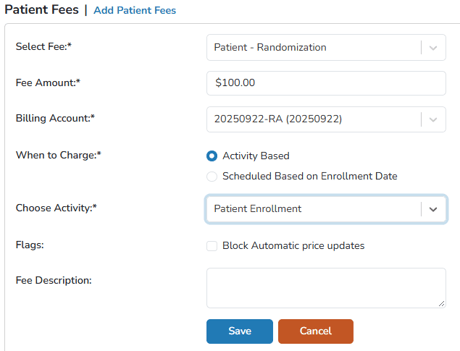
Patient fees can be used when charging for enrollment, enrollment plus switching arms, or on a scheduled basis (frequency selected).These fees are also referred to as randomization fees.
During the patient enrollment process, the fees established on the Edit Protocol: Billing tab under Patient Fees are presented on the screen and charged based on the fees entered. If the patient fees should not be assessed, the user can select to not charge during enrollment. If additional or other fees should be charged, the user can add a fee during enrollment or select the Fees (0) link.
Edits or Deletions of Patient Fees
Edits to patient fees include only allow users to change the price, billing account, activity, frequency of the fee or to block price updates. If you need to change the When to Charge option, a new fee must be created.
If the fee is deleted off the protocol, it will only impact new participant enrollments. Any participant previously enrolled with a schedule based patient fee will continue to have fees dropped unless removed from the patient when editing enrollment information for that participant on the protocol.
All historical charges will remain unchanged.
Monitor Visit Fees
Sites can charge for a monitor visit in the same fashion as patient fees – while closing the monitor visit, the fees established on the Edit Protocol: Billing tab under Monitor Visits are presented on the screen and charged when the user closes the visit. If the fees should not be assessed, the user can select to not charge during close out.
Tip - Monitor Visit Fees are not charged until the visit is closed out. They will not automatically charge on for each visit.
Edits or Deletions of Monitor Fees
Edits to monitor fees include only allow users to change the price, billing account, or to block price updates.
If the fee is deleted off the protocol, when closing a future monitor visit will accrue no charges.
All historical charges will remain unchanged.
Shipment Receipt Fees
An inventory fee would be assessed at the time of receipt of inventory. Inventory fees are established and work like Patient and Monitor Fees. If there are multiple fees, each fee will charge upon receipt.
Edits or Deletions of Shipment Receipt Fees
Edits to Shipment Receipt fees include only allow users to change the price, billing account, or to block price updates.
If the fee is deleted off the protocol, no charges will be made when creating a new shipment receipt.
All historical charges will remain unchanged.
Send Out Fees
To standardize send out fees for a study, users can add one or multiple Send Out Fees. These fees will be set to charge during the workflow. Any fees listed on the Send Out Fees page will charge upon completion of the Send Out. Fees will not charge during receipt unless a Shipment Receipt Fee is also on the study.
Edits or Deletions of Send Out Fees
Edits to Send Out fees include only allow users to change the price, billing account, or to block price updates.
If the fee is deleted off the protocol, no charges will be made when creating a new send out.
All historical charges will remain unchanged.
Patient Send Out Fees
To standardize patient send out fees for a study, users can add one or multiple Patient Send Out Fees. These fees will be set to charge during the workflow. If you are sending out multiple prescriptions in a single send out, each fee will charge once per Rx in the send out.
Edits or Deletions of Patient Send Out Fees
Edits to Patient Send Out fees include only allow users to change the price, billing account, or to block price updates.
If the fee is deleted off the protocol, no charges will be made when creating a new patient send out
All historical charges will remain unchanged.
Competency & Training Fees
To standardize fees related to adding a new competency, users can add one or multiple fees with the fee type “Competency & Training”. These fees will be suggested to the user in the dropdown during the workflow of setting up a new competency.
Edits or Deletions of Competency & Training Fees
Edits to Competency & Training fees include only allow users to change the price, billing account, or to block price updates.
If the fee is deleted off the protocol, no charges will be made when creating a competency. Any competency that has a fee attached to it will continue to charge if it is set to charge a fee during competency completion.
All historical charges will remain unchanged.
Protocol Close-Out Fees
These fees will not charge until a user completes the protocol close out wizard on a protocol. If a protocol is reopened after closing, the charge will not drop an additional time unless a new Close Out Fee is added.
Edits or Deletions of Close-Out Fees
Edits to Close-Out fees include only allow users to change the price, billing account, or to block price updates.
If the fee is deleted off the protocol, no charges will be made when closing out the protocol.
All historical charges will remain unchanged.