
If a user has created a Billing Fee Template on a protocol and the protocol has never had any previous fees applied, users can load the template to the protocol to minimize the amount of work by adding the fees manually. If the option is not available, that indicates that the protocol at one point had a fee added to it.
Required Permissions
EditProtocolBilling - Ability to edit Protocol Billing tab. Protocol Management permissions are required
ViewBilling - View billing in a protocol. Protocol Snapshot permissions are required
- Navigate to the Protocol
- Click on the Billing Tab
- Click on Manage
- (Optional, but Recommended) Add a Billing Account
- Click Add New in the Billing Account for this Protocol
- Select the appropriate account or Create a New Billing Account
- Click the blue Submit button
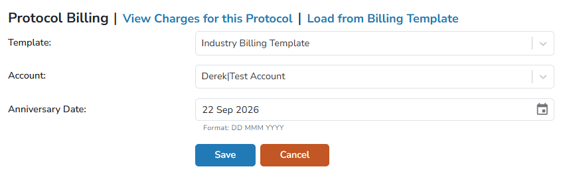
- Click on Load From Billing Template
- Select the appropriate templatefrom the Template menu
- Select the account add previously or leave as DO NOT BILL
- Modify the Anniversary Date if it is different from the default date.
- Click the blue Save button
Tip - The anniversary date is the service date that any One Time Fees will be charged as, and will also act as the date for any recurring charges.
All the fees added to the template will be loaded to the protocol. Users will need to take additional actions to ensure the dispensing fees are added appropriately on the order builds for the protocol.