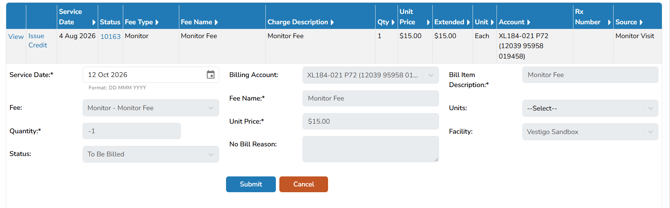
A credit is created as an ad hoc charge with a negative quantity. The resulting Extended Price appears in parentheses or by clicking on Issue Credit on the protocols billing tab. Identify the account and unit price before creating the credit.
Issuing a Credit with Negative Quantity
- Navigate to Billing tab on Protocol
- Click on Generate an Ad-Hoc Charge
- Select the Fee from the drop down menu
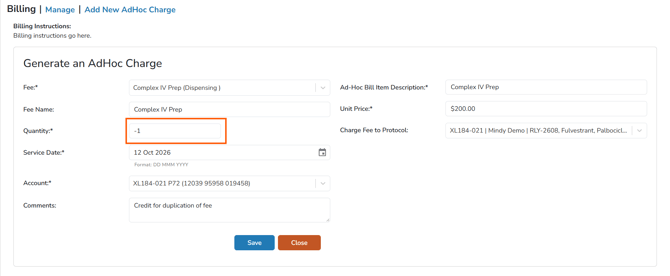
- Enter a negative number, such as -1, in the Quantity field
- Enter the price in the Unit Price field (if different than what is automatically generated)
- Enter any Comments, if needed
- Save
Note - When you view the charge, the Extended Price appears in parentheses to indicate a credit.
Issuing a Credit with Issue Credit
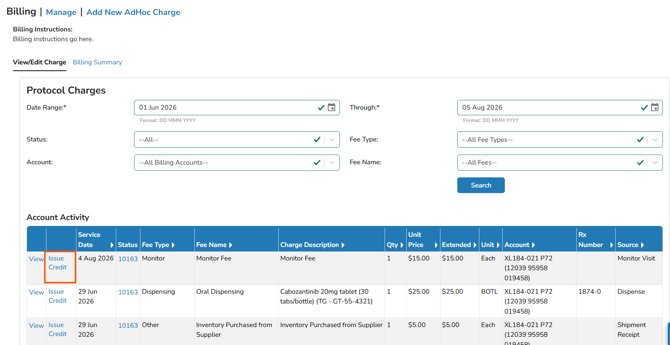
- Navigate to Billing tab on Protocol
- Click on Issue Credit
- Ensure the Service Date is correct. The other details will automatically populate based on the fee charged
- Submit