
Back to the Drug Build Overview
This article explains how to configure reorder settings for protocol drugs that are automatically resupplied or manually reordered. For manually reordered drugs, these settings help establish appropriate inventory levels, support reorder alerts and reports, and provide the information needed to calculate reorder quantities using the Par and Reorder Calculator.
Required permissions
ProtocolSnapshot - Ability to view the Summary page of a Protocol (Protocol Snapshot). Required for all other protocol view permissions.
ProtocolManagement - Protocol Management
EditProtocolDrugsOrders - Drug management for a protocol
Reorder Type
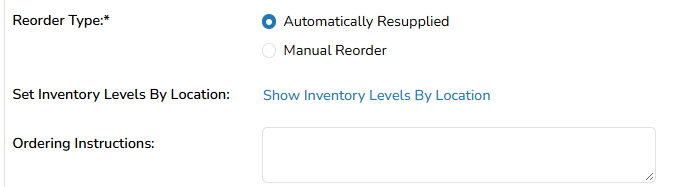
Choose Automatically Resupplied if inventory is replenished without manual ordering. If inventory is automatically managed by an IRT system, in most cases, the drug build will be Automatically Resupplied
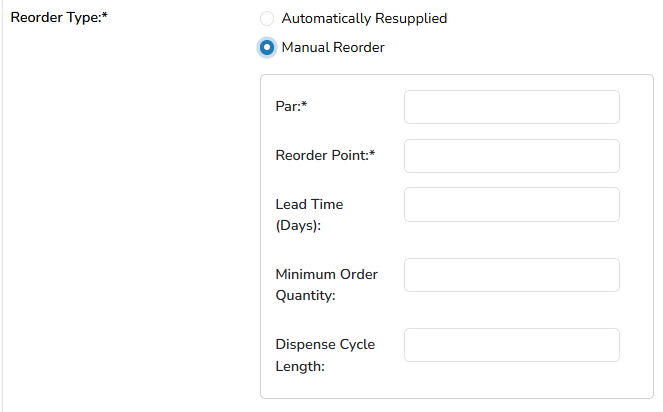
When Manual Reorder is selected, additional fields become available, and the drug appears in applicable reorder reports and alerts. Optional fields can also support reorder calculations using the Par and Reorder Calculator. For additional guidance, refer to the Par and Reorder Calculator article.
Manual Reorder Options
| Par |
The Par Level is the maximum amount of IP to maintain on hand for adequate dispensing. Example Formula: Par Level = # of Patients * Units Required per Dispense * (Forecast Days/Cycle Length) |
| Reorder Point | The Reorder Point is the minimum amount of inventory to always maintain on hand. Once the number has been reached, an alert will appear in the facility alerts. |
| Lead Time (Days) | Amount of time in days from when shipment is placed until IP arrives. |
| Minimum Order Quantity | The lowest denomination of units allowed by supplier per order. Consider inventory units vs dispensing units. |
| Dispense Cycle Length | The average of the average number of days between visits (dispenses) where this drug is dispensed. This is an optional field; if no value is indicated, the system will enter that value based on dispenses (per prescription fill) when utilizing the Par and Reorder Point Calculator. The field is also modifiable on that screen. |
Inventory Levels By Location
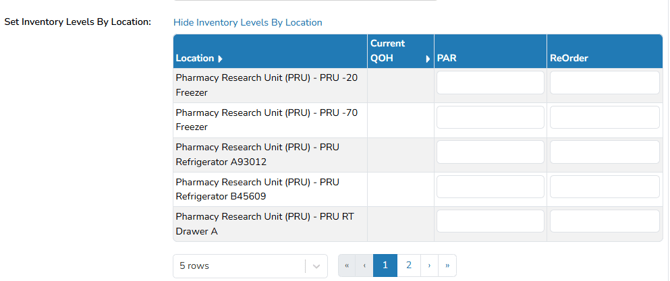
If the inventory is set to manual reorder and the inventory is stored in multiple locations or facilities, users can optionally set Par and Reorder Points per inventory location. When these are setup, Reorder Alerts will be visible in the facility where the inventory location as dropped to or below the Reorder Point.
Ordering Instructions
Instructions for a user on how to order more of the drug supply. This will display on the Reorder Report, and when using the Par and Reorder Calculator.