
Back to the Drug Build Overview
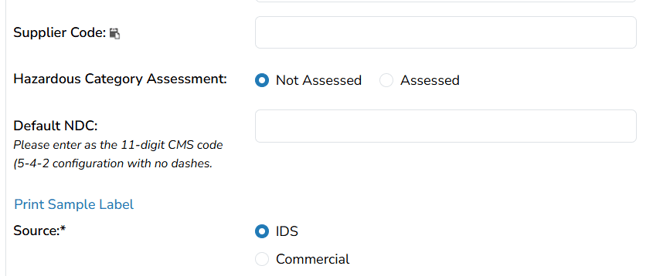
This article explains how to configure the classification and identification fields within a protocol drug build, including the drug schedule, supplier code, hazardous category, default NDC, and source. These settings help document important product details and determine how drug information appears during inventory transactions and on applicable reports.
Required permissions
ProtocolSnapshot - Ability to view the Summary page of a Protocol (Protocol Snapshot). Required for all other protocol view permissions.
ProtocolManagement - Protocol Management
EditProtocolDrugsOrders - Drug management for a protocol
Drug Schedule
Set the US FDA drug schedule for the drug. This setting is visible on various reports.
Note - Edits to the drug schedule will impact reports where this information is visible.
Supplier Code
The supplier code refers to the code used when placing a drug order; if you are ordering through NIH, this is known as the NCS code. This field may be used for any type of code. Please keep in mind the following if you enter a supplier code:
-
For drugs entered as Manual Reorder, the code will appear on the Reorder Report.
-
The code will be visible only when using the ACTG DARF format.
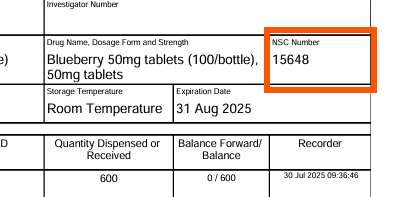
Note - Edits to the Supplier Code will impact reports where this information is visible.
Hazardous & Local Assessment Categories
The NIOSH categories and local assessment can be captured in this field. The hazardous section allows a site to indicate if the drug has been locally assessed. While the options available in the NIOSH Category cannot be customized, sites can manage local site-specific hazardous categories in Application Administration. These settings are visible on various reports and can also be pulled to certain Vestigo labels.
This section of the drug build allows users to:
- Record if a drug has been assessed for a hazardous classification
- Record their local assessment of hazardous category separate from a NIOSH category or not track Hazardous Category on a drug at all
- The selections made on the drug build will be displayed to users when performing inventory transactions that include the drug build
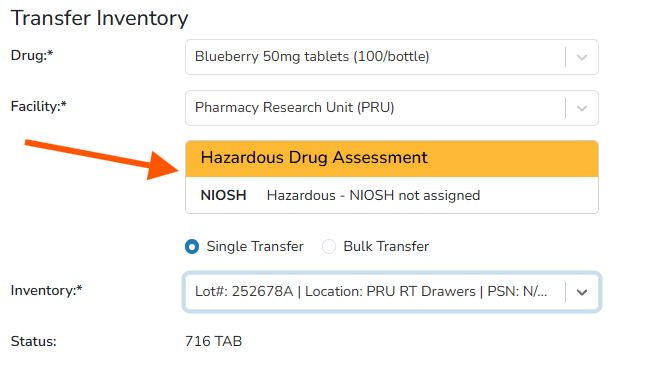
Note - Edits to any of the Hazardous Categories will impact reports where this information is visible.
Default NDC
NDC of the drug, if available; entered as 11-digit code without hyphens. If this field is populated, the NDC will automatically be entered when receiving new inventory. This setting is visible on various reports but may differ from the default if it was changed during receipt or editing.
Edits to an NDC Number on the Drug Build
Some sites utilize the NDC number for EHR Dispense Prep systems. This number can be defaulted and can also appear on inventory labels.
If you are updating a drug build NDC number, this may be a two-step process:
- Updating the drug build (this article) - This only updates future inventory received
- Updating current inventory
If you are looking to modify the inventory NDC number for current inventory, please reference this article.
- Navigate to the protocol.
- Click on the Edit Protocol.
- Click on Drugs/Orders Tab.
- Click Edit on the drug build that needs to be updated.
- Scroll down and locate the Default NDC field
- Add or modify the existing NDC number.
- Scroll down and click the blue Save button.
Users will need to determine if you need to update on hand inventory to reflect the updated NDC.
Note - Edits to the Default NDC does not impact historical inventory.
Source
IDS Vs. Commercial. Whether the product is investigational or from a commercial source. There is no functionality with the selection made, but it is visible in various reports.
Note - Edits to the Source will impact reports where this information is visible.