
Back to the Drug Build Overview
This article explains how to configure temperature excursion actions and the default information used when receiving inventory and generating drug accountability records. These settings help ensure users follow the appropriate process for temperature excursions while consistently applying supplier, manufacturer, and DARF information throughout applicable inventory workflows.
Required permissions
ProtocolSnapshot - Ability to view the Summary page of a Protocol (Protocol Snapshot). Required for all other protocol view permissions.
ProtocolManagement - Protocol Management
EditProtocolDrugsOrders - Drug management for a protocol
Temperature Excursion Action
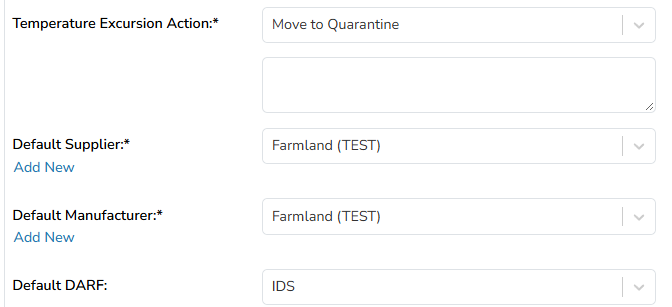
This setting drives the default action selected when a user is recording a Temperature Excursion through the Temperature Excursion pathway. The available options are: Move to Quarantine, Document Only, or No Action.
The Move to Quarantine function will record a temperature excursion on the DARF and move the inventory to quarantine. If Document is selected, no inventory will be moved, but a temperature excursion will be recorded on the DARF.
Temperature Excursion Instructions
The free text field below the action is an optional field to use for Temperature Excursions. We recommend adding the permitted storage range, along with any allowable excursions as defined by the sponsor or commercial labeling. You can also enter any sponsor defined or internal processes that need to be done for this inventory.
The text will be visible when recording a temperature excursion in the Temperature Excursion Pathway.
Note - Edits to the Temperature Excursion Action or Instructions have no historical impact, but the change will show in the audit log.
Default Supplier and Manufacturer
The default supplier and Manufacturer when receiving new inventory of the drug. This field is required for full inventory and dispense only drugs builds. Use Add New if the option you need is not listed; once added to one dropdown, it will be available in both Supplier and Manufacturer. They can also be modified in the Site Master in Application Administration.
Edits to the Default Supplier and Manufacturer
Suppliers and Manufacturers can change throughout the course of study, or maybe even from protocol start up. When a site enters a Supplier or Manufacturer, the newly entered data can be used for both data points.
If you are updating a drug build supplier or manufacturer, this may be a two-step process:
- Updating the drug build (this article) - This only updates inventory on future receipts.
- Updating the current inventory
If you are looking to modify the supplier or manufacturer for current inventory, please reference the supplier article or the manufacturer article.
If you are looking to add or modify an existing supplier or manufacturer, please reference this article.
Default DARF
Users can select a default DARF for the inventory. This will be the default form selected when generating the DARF within Vestigo and Vestigo Verify. Can be adjusted during generation.
Note - Edits to the Default DARF have no historical impact, but the change will show in the audit log.