
Creating a Competency
Sites can create Global Competencies or Protocol-Specific Competencies in Vestigo.
- Global Competencies are created under Protocol Management > Competency Management and can be imported into multiple protocols.
-
Protocol-Specific Competencies are created and managed directly within an individual protocol.
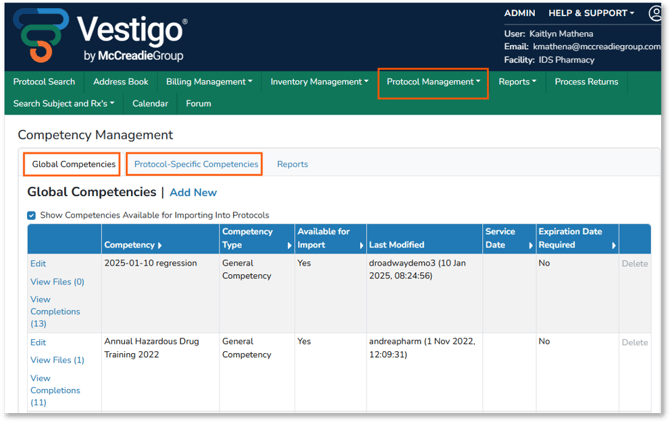
Once a Global Competency is imported or a Protocol-Specific Competency is created, the competency can be configured with the appropriate details and restriction levels.
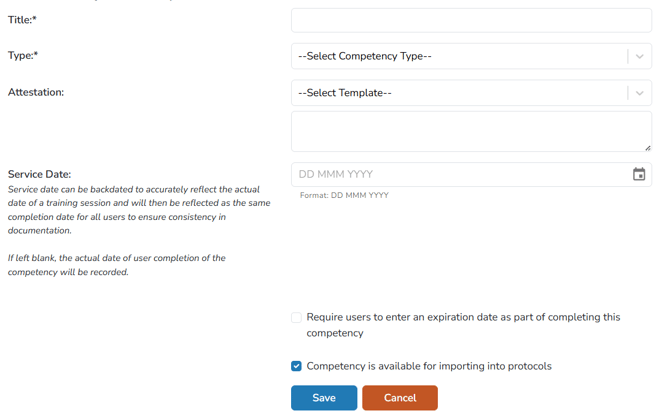
Title
The competency title should clearly identify the topic, scope, version, or document release date. Using a standard naming format helps maintain consistency and makes competency records easier to understand.
Competency titles and attached files are visible to monitors as Competency Documents in Vestigo Verify. Monitors can generate the Pharmacy Training Record from the Reports tab. On the report, competency titles and file names appear as column headers above each user’s completion record. Sites may also share their competency naming system as a Facility Document to provide monitors with additional clarity
Attestation
The attestation field allows for a free-text or templated statement to be added. This statement should reflect the meaning or process that the user is acknowledging when completing the competency. Utilizing a templated statement ensures consistent verbiage across certain types of competencies. Templates can be created and managed underneath Protocol Management.
Service Date
When creating the Competency Details, the Service Date will initially be set to blank. The service date can be backdated to reflect the actual date of a training activity, such as:
- A live or virtual Site Initiation Visit
- A training session
- A webinar
- A document review
If the service date is left to the default date of competency creation, then the service date for each user will be the day that they record their completion in Vestigo.
Setting Expiration Dates for Competencies
When creating a competency, sites can require users to enter an expiration date when recording their completion.
Competencies that may require an expiration date include:
- CITI training
- GCP training
- Licensure
- Aseptic technique training
Protocol document amendments are less likely to require an expiration date because the release or approval date of the next version may not be known.
Sites can use the Users with Expiring Competencies Report under Protocol Management > Competency Management to review upcoming competency expirations.
Competency is Available for Importing into Protocols
This check box is only available when creating a Global Competency and allows the competency to be imported into any protocol. Unchecking this box will not allow a Global Competency to be imported into a protocol at all or anymore if edited.
Note - In order for a competency to be completed by any user, it must exisit or be imported into a protocol.
Adding and Managing Competency Documents
Files can be uploaded or created on a competency so users can review the related training materials. Examples include:
- Protocol documents
- Pharmacy manuals
- Pharmacy summary sheets
- Summary of Changes documents
Note: Competency titles and documents can be added, edited, or removed until a user records a completion. After a completion is recorded, only the Visibility to Monitor and Documentation Certification settings can be modified.
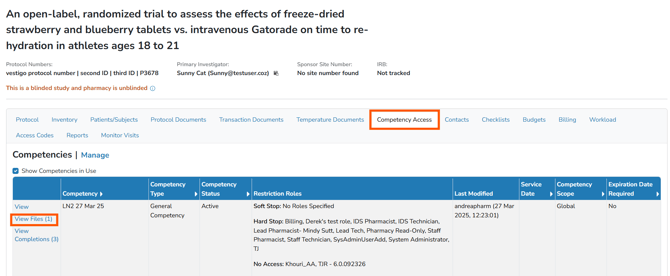
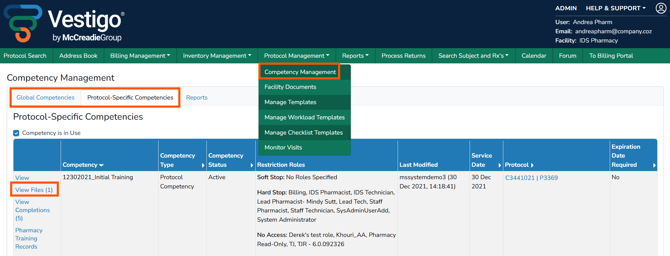
Competency documents are available from the Competency Access tab within a protocol where competecies exisit, and under Competency Management within the Protocol Management dropdown. They do not appear on the Protocol Documents or Transaction Documents tabs. Monitors can view these files under Competency Documents.
Tip: If users need to upload individual proof of training, such as a CITI or IRT training certificate, Facility Documents may be a more appropriate location.