
Competency Restriction Levels
Competency restriction levels determine whether a user can access a protocol before completing a competency. Restriction levels for Global and Protocol-Specific Competencies are assigned by Vestigo User Role from the protocol’s Competency Management tab.
The available restriction levels are:
- No Access: The user cannot access the protocol or complete the competency.
- Hard Stop: The user must complete the competency before accessing the protocol.
- Soft Stop: The user is prompted to review and complete the competency but can bypass it and access the protocol.
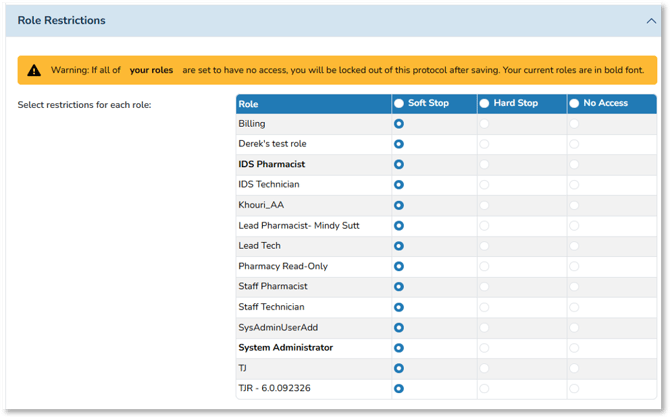
When a user navigates to a protocol, Vestigo presents any applicable competency requirements.
Using the No Access Competency Restriction
The No Access restriction prevents users with the selected Vestigo User Role from accessing the protocol. Users are not given the option to complete the competency to gain access.
This restriction may be used when:
- Certain users do not have a need to access the study.
Example: Enrollment and Dispensing occur during IDS hours, therefore Staff Pharmacists/Staff Technicians will never need to access - Protection of PII/Sponsor Information on sensitive studies (e.g., mental health & addiction studies) or those that are conducted on hospital employees (e.g., COVID-19 treatments or vaccinations)
- Protection of blinding information on certain studies
- Non-Pharmacy Personnel is added as a Vestigo User Role to access to certain protocols and manage contacts and/or study data
- Specific Example: Research Data Coordinator (Lead) is given Vestigo User Role access to manage the contacts on unblinded protocols.
- Here, a Global Competency can be created and imported to blinded protocols, setting the Role to No Access restriction
- Research Data Coordinator (Lead) then cannot access these protocols which would potentially lead to unblinding
- Specific Example: Research Data Coordinator (Lead) is given Vestigo User Role access to manage the contacts on unblinded protocols.
Warning: If a No Acess stop is used on a competency, the user role(s) assigned to the No Access stop are locked out of a protocol. The protocol will not be able to accessed by the user role(s) for participant management and dispensing. No Access also prevents any and all accountability transactions for that user role.
Using the Hard Stop Competency Restriction
The Hard Stop restriction requires the user to complete the competency before accessing the protocol.
This restriction may be used to document required training, including:
- Site Initiation Visit training.
- Protocol and amendment training.
- Pharmacy Manual and amendment training.
- Investigator’s Brochure training.
- CITI or GCP training.
- IRT or IXRS system training.
- Vestigo training.
- Other training required by the sponsor.
Tip - For version-controlled documents, inactivate the competency for the previous version and create a new competency for the current version. Depending on the type of training, a Global Competency may be more appropriate when the same requirement applies to multiple protocols.
Caution - Apply Hard Stop restrictions consistently with the site’s SOP or Training Policy. An inappropriate restriction may allow users to complete and document training when they should not or create inconsistencies in protocol training records.
Using the Soft Stop Competency Restriction
The Soft Stop restriction alerts the user that a competency applies to the protocol. The user can review the competency and attached files, record a completion, or bypass the competency and enter the protocol without completing it.
This restriction may be used for:
- Users who should review protocol training but do not sign training records under the site’s SOP.
- Users who need protocol access but do not perform routine dispensing or patient-care activities.
- Non-pharmacy billers, IT administrators, or data managers who need protocol access.
- “Nice-to-know” documents that should be reviewed but do not require recorded completion.
- User roles that do not need to complete the competency.
Sites should establish clear training procedures so users understand whether they are expected to complete and record a competency or bypass it.
How Multiple User Roles Affect Competency Restrictions
Competency restrictions are applied according to a user’s Vestigo User Roles. When a user has multiple roles across facilities, the interaction between those roles can affect the restriction that applies.
- If one competency is assigned to the protocol, the least restrictive role across the user’s facilities takes precedence.
- If multiple competencies are assigned to the protocol, the most restrictive applicable competency takes precedence.
- For the same competency, Soft Stop is more permissive than Hard Stop or No Access.
- If one of the user’s roles is set to Soft Stop, that setting will prevail over a less permissive setting for the same competency.
- If a user has roles with No Access and Hard Stop for the same competency, the more permissive Hard Stop setting will prevail.
Important: Review all applicable roles before assigning competency restrictions. A more permissive role may allow a user to access a protocol even when another role is assigned Hard Stop or No Access.