
Billing cycles process charges, generate invoices and statements of activity, and provide tools for managing, updating, printing, emailing, and recording payments.
Billing Cycles
Automated Billing Cycles
Clients can elect to have billing cycles set up as an automatic job that runs on a schedule. This cycle marks any fees in a To Be Billed status to a Billed status and the job generates the invoices and statements of activities. Billing cycles are typically run monthly to match other hospital billing cycles.
If you would like to set up automated billing cycles, please contact Vestigo support at support@mccreadiegroup.com.
Manual Billing Cycles
A manual billing cycle changes eligible charges from To Be Billed to Billed and creates invoices and statements of activity.
Generating a Manual Billing Cycle
- Navigate to Billing Management
- Select Billing Main
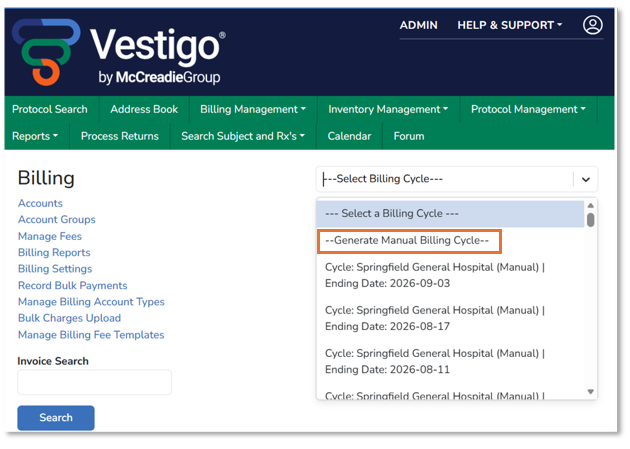
- Open the Select a Billing Cycle list
- Select the top option, “Generate Manual Billing Cycle”
- Enter an cycle End Date (last day of the billing period)
- If accounts are grouped, one group of accounts can be selected for separate cycles one by one, otherwise, select Search All Groups.
- Select the accounts or entire account group to “cycle” (invoice)
- Click the Process button
- Click Close after processing is complete
Vestigo will process the cycle immediately, finding any charges with “To Be Billed” status and invoicing those charges per account per protocol. Once processed, the screen will display a validator to close the screen.